
Fund Marketplace
List Monark's evergreen fund catalogue, with search, asset class filters, and the entry minimum of each fund.
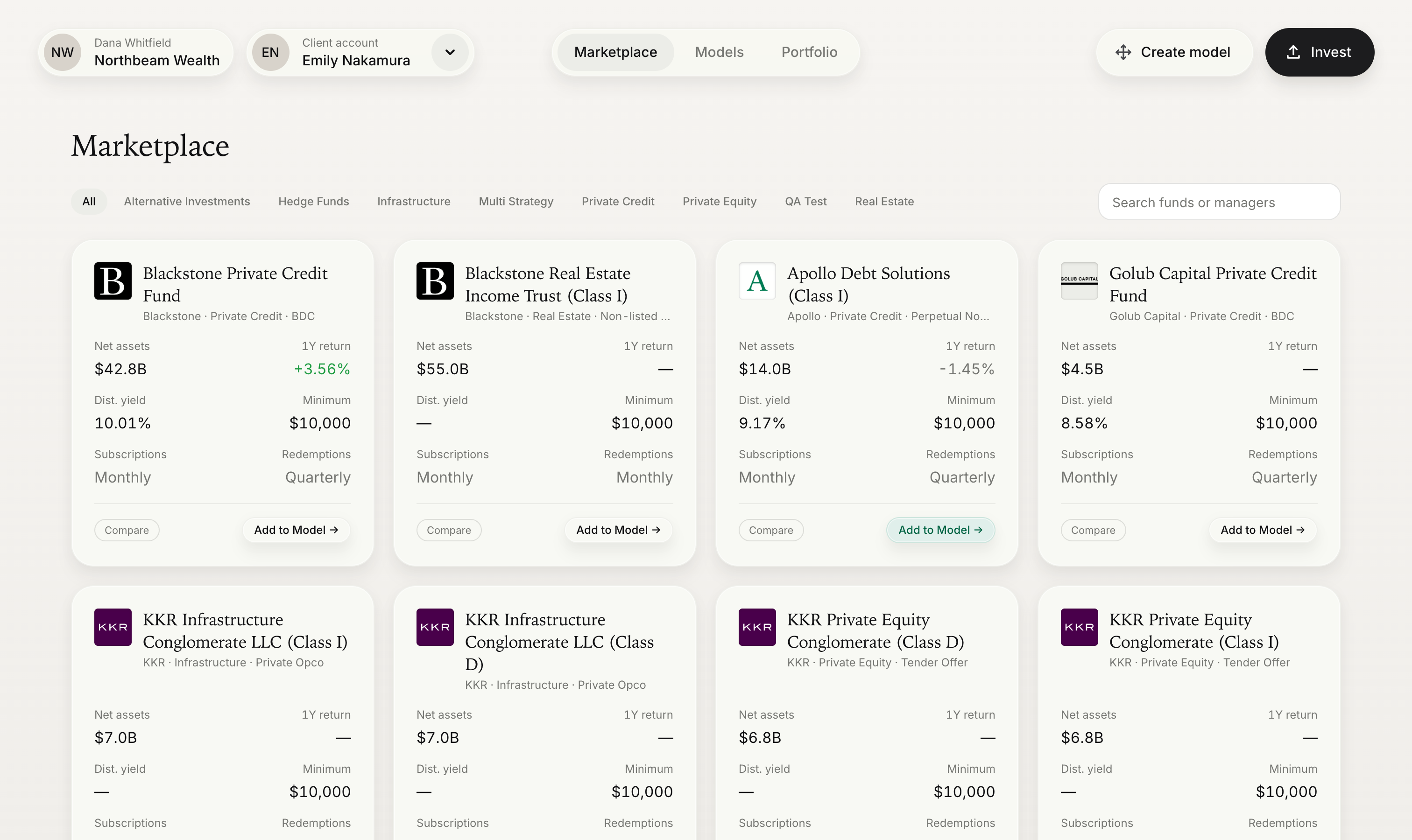
The marketplace is Monark's catalogue of evergreen funds. It is usually the entry point to the rest of the integration: a user finds a fund here, opens its Fund Detail page, and invests from there.
Endpoints used
| Method | Endpoint | Purpose |
|---|---|---|
GET | /primary/v1/omnibus/fund | List funds, with their share classes, search, filtering, and pagination |
Workflow
- Request the first page of funds. Pass the user's search text and asset class filter through to the API instead of filtering in the browser.
- Render one card per fund. Show the lowest initial minimum across the fund's embedded
shareClasses[]as its entry minimum. - Open the Fund Detail page when a card is selected, passing the fund's
id.
List funds
GET /primary/v1/omnibus/fund?page=1&pageSize=25&assetClass=Private%20Credit| Query parameter | Type | Description |
|---|---|---|
searchTerm | string | Matches fund name or symbol. Bind this to your search box. |
assetClass | string | Restricts results to one asset class. Must match the fund's assetClass exactly. |
sortOrder | string | Ascending or Descending by when the fund was last updated. Defaults to Descending. |
page | integer | Page number. Defaults to 1. |
pageSize | integer | Results per page. Defaults to 25, maximum 1000. |
A trimmed response:
{
  "items": [
    {
      "id": "01a05a22-0000-7000-8000-0000000000f1",
      "name": "Example Private Credit Fund",
      "symbol": "EXPCX",
      "logoUrl": "https://cdn.example.com/logos/expcx.png",
      "assetClass": "Private Credit",
      "structure": "BDC",
      "aum": 77000000000,
      "currency": "USD",
      "vintage": 2021,
      "subscriptionCadence": "Monthly",
      "redemptionCadence": "Quarterly",
      "distributionCadence": "Monthly",
      "allInvestors": true,
      "accreditedInvestor": false,
      "fundManager": { "id": "a1b2c3d4-0000-4000-8000-000000000001", "name": "Example Asset Management" },
      "shareClasses": [
        {
          "id": "01a06194-0000-7000-8000-0000000000c1",
          "omnibusFundId": "01a05a22-0000-7000-8000-0000000000f1",
          "series": "Class I",
          "symbol": "EXPCX",
          "cusip": "000000000",
          "initialMinimumInvestment": 2500,
          "subsequentMinimumInvestment": 500
        }
      ]
    }
  ],
  "pagination": { "totalRecords": 42, "totalPages": 2, "currentPage": 1 }
}
The list is the whole catalogue: it is not filtered to the funds your platform can trade. Fund access is granted per custodian, and an order for a fund that the account's custodian has not been enabled for is rejected with FinancialInstitutionFundAccessDenied. Confirm with Monark which funds each of your custodians is enabled for before you present a fund as investable.
Fund cards
The fields you show are your choice. The reference implementation uses a card that answers the first questions an advisor or investor asks: what the fund is, who manages it, how large it is, how liquid it is, and what it costs to get in.
| UI element | Source | Notes |
|---|---|---|
| Logo | Fund.logoUrl | Fall back to the fund's initials when null. |
| Fund name | Fund.name | |
| Manager | Fund.fundManager.name | |
| Asset class | Fund.assetClass | A free-text label, such as Private Credit. |
| Structure | Fund.structure | For example, interval fund, tender offer fund, REIT, or BDC. |
| Assets under management | Fund.aum | Denominated in Fund.currency. Abbreviate large values, such as "$77.0B". |
| Subscriptions | Fund.subscriptionCadence | Daily, Weekly, Monthly, Quarterly, or Annual. |
| Redemptions | Fund.redemptionCadence | Weekly, Monthly, Quarterly, or Annual. |
| Minimum investment | Lowest ShareClass.initialMinimumInvestment for the fund | See Entry minimums, below. |
| Card action | Fund.id | Opens the Fund Detail page. |
Search and filters
Search and asset class filtering run on the server, so they work across the whole catalogue and not only the page that is loaded.
- Search. Send the contents of the search box as
searchTerm. Debounce the input so that you send one request when the user pauses, not one per keystroke. - Asset class chips. Build the list of chips from the distinct
assetClassvalues across the catalogue instead of hard-coding it, so that new asset classes appear automatically. The list is paged, so read them from a request withpageSize=1000rather than from the page on screen, and pass the value back asassetClassexactly as returned. - Paging. Reset
pageto 1 whenever the search text or filter changes.
Entry minimums
Investment minimums belong to the share class, not to the fund. Each fund in the list includes its shareClasses[], so take the lowest initialMinimumInvestment across them to show a single "minimum investment" on each card. No second request is needed.
When you need share classes on their own, for example for a single fund, use GET /primary/v1/omnibus/share-class?omnibusFundId={id}.
Note:
initialMinimumInvestmentcan be null, which means the share class has no minimum. Treat null as zero when you compute a fund's entry minimum, and display it as "No minimum" instead of "$0".
Implementation notes
- Cache the catalogue. Fund and share class data changes infrequently. Caching it for the length of a session keeps the marketplace responsive.
- Show eligibility early. If your platform knows the active account, flag funds whose investor requirements the account does not meet. See Accounts & Eligibility.
- Handle empty results. A search or filter with no matches returns an empty
itemsarray. Offer a way to clear the search instead of showing a blank page.
Next steps
- Build the page a card opens: Fund Detail
Updated about 1 month ago