
Accounts & Eligibility
Create the client accounts that orders are placed for, label them in your UI, and check each account against a fund's investor eligibility.
Every Omnibus order is placed for an account. The account's id is the accountId you send when you evaluate requirements, submit orders, and read positions, orders, and distributions. Set accounts up once, when a client is onboarded to your platform, and reuse them for every order afterwards.
Endpoints used
| Method | Endpoint | Purpose |
|---|---|---|
POST | /primary/v2/person | Create an individual owner |
POST | /primary/v2/entity | Create an entity owner, such as a trust or LLC |
POST | /primary/v2/entity/{id}/individuals | Add an individual to an entity |
POST | /primary/v2/account | Create an account for its owners |
GET | /primary/v2/account | List accounts, optionally for one owner (partyId) |
GET | /primary/v2/account/{id} | Retrieve one account |
PUT | /primary/v2/account/{id}/accreditation | Record the account's accreditation status |
How accounts are structured
An account is held at one custodian, identified by its financialInstitutionId, and has owners: exactly one, or two Person owners for a Joint account. Each owner is a party - a Person or an Entity - that is created separately under the same financialInstitutionId and referenced by its partyId. One owner is marked as the primary owner.
| Field | Description |
|---|---|
id | The accountId used across the Omnibus endpoints. |
financialInstitutionId | The custodian that holds the account. |
externalAccountNumber | The custodian's account number for the client. Stored trimmed and upper-cased, and must be unique for the custodian. Returned on every order placed for the account. |
registrationType | Individual, Joint, Retirement, or Entity. |
registrationSubtype | Further detail for Joint and Retirement accounts. See the table below. |
owners[] | Each owner's partyId, type (Person or Entity), and isPrimary flag. |
accreditationStatus | Empty until set. Otherwise the basis on which the account is accredited, NOT_APPLICABLE (not accredited), or NOT_SPECIFIED (not collected). |
accreditationUpdatedAt | When the accreditation was last set. |
status | Active or Closed. |
registrationType | Accepted registrationSubtype values |
|---|---|
Individual | None |
Joint | JointTenantsWithRightsOfSurvivorship, TenantsInCommon, TenantsByEntirety, CommunityProperty |
Retirement | TraditionalIRA, RothIRA, RolloverIRA, SEPIRA, SimpleIRA, BeneficiaryIRA, BeneficiaryRothIRA |
Entity | None |
Create an account
- Create each owner with
POST /primary/v2/personorPOST /primary/v2/entity, using the samefinancialInstitutionIdas the account. Keep theidthat is returned - this is the owner'spartyId. - For an entity owner, add at least one individual with
POST /primary/v2/entity/{id}/individuals. - Create the account with
POST /primary/v2/account, listing every owner and marking one as primary. Owners created under a differentfinancialInstitutionIdare refused with400.
POST /primary/v2/account{
"financialInstitutionId": "75a1c2e4-0000-4000-8000-000000000001",
"registrationType": "Joint",
"registrationSubtype": "JointTenantsWithRightsOfSurvivorship",
"externalAccountNumber": "8841-2207",
"owners": [
{ "partyId": "0a4f6c1e-0000-4000-8000-000000000011", "type": "Person", "isPrimary": true },
{ "partyId": "0a4f6c1e-0000-4000-8000-000000000012", "type": "Person", "isPrimary": false }
]
}Important: An account registered to an entity cannot place orders until the entity has at least one active individual associated with it (for a trust, an active trustee). Orders for an account that is not fully set up are refused with
400andAccountInvalid.
Send the custodian's account number as externalAccountNumber. It is echoed on every order for the account, which lets your operations team reconcile Monark's order records against your own without maintaining a separate ID mapping.
Display accounts
Accounts have no display name of their own. Label an account with the names of its owners, primary owner first, and resolve each name from the owner's partyId:
- For a
Person, callGET /primary/v2/person/{id}. - For an
Entity, callGET /primary/v2/entity/{id}.
| UI element | Source | Notes |
|---|---|---|
| Account name | Person.firstName + Person.lastName, or Entity.legalName | One name per entry in owners[]. Show the owner with isPrimary: true first. |
| Account number | Account.externalAccountNumber | The custodian's account number. May be null if you did not supply one. |
| Registration | Account.registrationType, Account.registrationSubtype | For example, "Joint - JTWROS" or "Retirement - Roth IRA". |
| Status | Account.status | Hide or disable Closed accounts. |
On advisor platforms, list the accounts of an advisor's clients by calling GET /primary/v2/account with the partyId of each client, and cache owner names alongside the account so the picker does not re-resolve them on every page load.
Check eligibility
Each fund declares the investor types it accepts. Read these flags from the fund (see Fund Detail) and compare them with what you know about the account before you offer the fund. Monark does not check these flags when an order is placed, so your platform is responsible for applying them.
| Fund field | When true |
|---|---|
allInvestors | The fund is open to all investors, including non-accredited investors. |
accreditedInvestor | The fund requires accredited investors. |
qualifiedClientInvestor | The fund requires qualified clients. |
qualifiedPurchaserInvestor | The fund requires qualified purchasers. |
nonUSInvestor | Informational only. Non-US investors are not supported on Omnibus, so do not offer funds to non-resident alien or foreign accounts. |
Separately from the fund's flags, Monark checks the account's accreditation on every order. Orders are refused with 403 and AccountAccreditationInvalid if the accreditation is missing, was set more than 12 months ago, or is NOT_APPLICABLE. This currently applies to every fund, including funds with allInvestors. Once your platform has established the account's status, record it:
PUT /primary/v2/account/{id}/accreditation{
"accreditationStatus": "NET_WORTH_GT_1M"
}The accepted values are listed in the Update Account Accreditation reference. For a sample self-attestation flow, see the Accreditation guide.
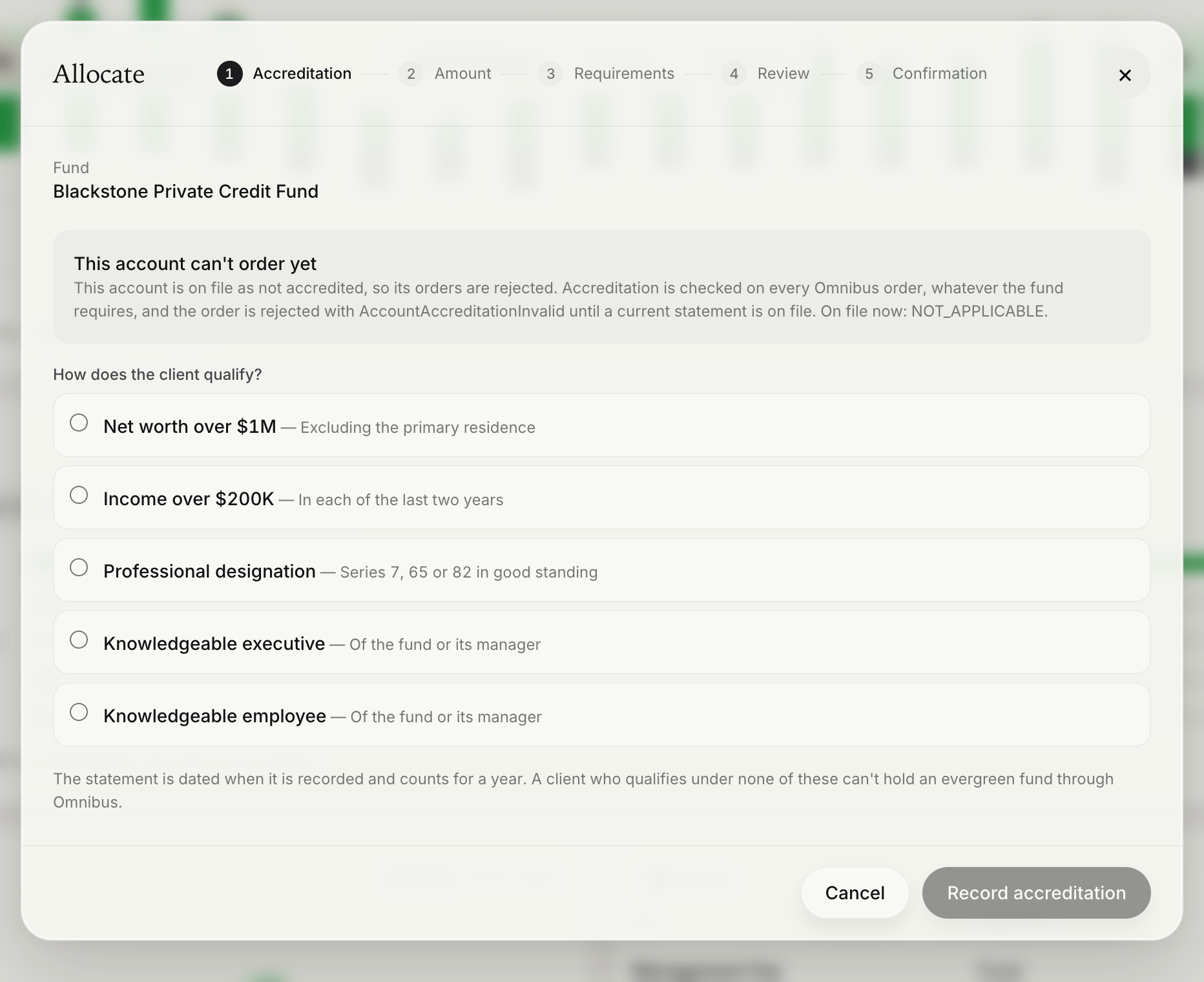
Note: Monark stores the accreditation status that you report and makes it available to the custodian. Apply your firm's own verification policy before you update it. Values that don't fit the account's registration type, such as a joint-only value on an individual account, are refused with
400.
Eligibility flags are a first-pass filter for your catalogue. They do not replace the fund's own disclosures and suitability questions, which Monark evaluates for each account at order time. See Pre-Order Requirements.
Next steps
- Present the fund catalogue: Fund Marketplace
- Evaluate what an account must complete before it can invest: Pre-Order Requirements
Updated 27 days ago