
Pre-Order Requirements
Find out which disclosures, signatures, and questionnaires a fund requires for an account, collect them in your UI, and report them to Monark.
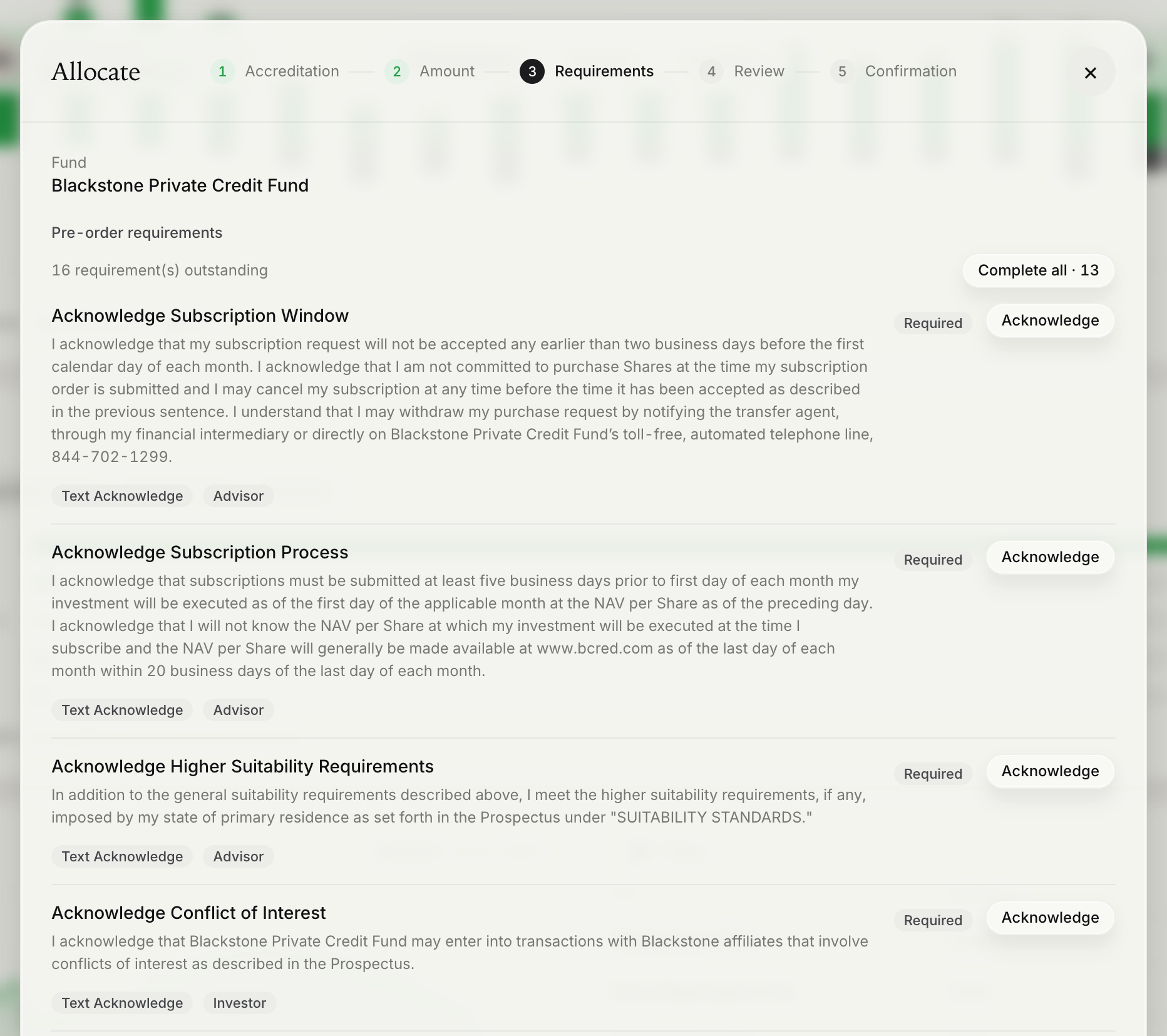
Evergreen fund subscriptions on the Omnibus platform do not use paper subscription documents. In their place, each fund defines a set of requirements - disclosures, acknowledgements, e-signatures, and suitability questionnaires - that must be satisfied before it accepts an order. Monark tells you which requirements apply to a given account and order. Your platform presents them in its UI, in most cases to the advisor, collects the responses, and reports each one back. All actions are stored and auditable.
Monark keeps each response with the order and makes it available to the custodian.
Evaluate requirements after the user has chosen a fund and share class, and before you show them an order ticket they can submit.
Endpoints used
| Method | Endpoint | Purpose |
|---|---|---|
GET | /primary/v1/omnibus/order-action/requirements | Evaluate the requirements for one account and order |
PUT | /primary/v1/omnibus/order-action/requirements/{definitionId}/complete | Report that a requirement has been completed |
GET | /primary/v1/questionnaire/{id} | Retrieve the questions of a questionnaire requirement |
POST | /primary/v1/questionnaire-answer | Submit questionnaire answers, which satisfies the requirement |
POST | /primary/v1/omnibus/order-action/requirements/batch | Evaluate many accounts at once. See Model Orders. |
Workflow
- Evaluate requirements for the account, advisor, fund, share class, and side.
- If
allSatisfiedistrue, continue to the order ticket. Some funds have no requirements at all. - Otherwise, present each requirement whose
statusisRequired, using the control that matches itstype. - As the user completes each requirement, report it to Monark.
- Evaluate again, and continue only when
allSatisfiedistrue.
Evaluate requirements
GET /primary/v1/omnibus/order-action/requirements?accountId={accountId}&financialAdvisorId={financialAdvisorId}&omnibusFundId={fundId}&omnibusShareClassId={shareClassId}&side=Buy| Query parameter | Required | Description |
|---|---|---|
accountId | Yes | The account the order will be placed for. |
omnibusFundId | Yes | The fund being traded. |
omnibusShareClassId | Yes | The share class being traded. |
side | Yes | Buy or Sell. Funds can define different requirements for each side. |
financialAdvisorId | Conditional | The advisor placing the order. Send it whenever the order will carry an advisor. |
{
  "allSatisfied": false,
  "actions": [
    {
      "definitionId": "5c1d8a52-0000-4000-8000-0000000000d1",
      "name": "Acknowledge Subscription Process",
      "description": null,
      "type": "TextAcknowledge",
      "responsibleParty": "Advisor",
      "status": "Required",
      "actionText": "I acknowledge that subscriptions must be submitted at least five business days prior to the first day of each month.",
      "markdownText": null,
      "dataId": null,
      "documentType": null
    },
    {
      "definitionId": "5c1d8a52-0000-4000-8000-0000000000d2",
      "name": "Investor Suitability Questionnaire",
      "description": null,
      "type": "Questionnaire",
      "responsibleParty": "Investor",
      "status": "Satisfied",
      "actionText": null,
      "markdownText": null,
      "dataId": "9e2b7f10-0000-4000-8000-0000000000a7",
      "documentType": null
    }
  ]
}
Important: Requirements are evaluated for the combination of account and advisor. Send the same
financialAdvisorIdwhen you evaluate requirements, when you complete them, and when you submit the order. If you omit the advisor here but attach one to the order, the requirements that the advisor is responsible for are never presented. An individual order is then held inPendingActionsuntil they are completed, and a batch of model order lines is refused with409(RequiredOrderActionsIncomplete).
Present requirements
| UI element | Source | Notes |
|---|---|---|
| Title | Requirement.name | |
| Summary | Requirement.description | Optional. |
| Disclosure text | Requirement.markdownText, falling back to Requirement.actionText | markdownText is Markdown. Render it as formatted text. |
| Status | Requirement.status | Required or Satisfied. |
| Responsible party | Requirement.responsibleParty | Investor, Advisor, CoOwner, Partner, or Monark. |
| Action | Requirement.type | See the table below. |
| Progress | Count of requirements with status: Required | For example, "3 of 13 outstanding". |
Show Satisfied requirements as complete instead of hiding them. Users and compliance reviewers benefit from seeing the full set of disclosures that applies to the order.
Requirement types
type | What the user does | Uses dataId | How it is satisfied |
|---|---|---|---|
TextAcknowledge | Reads the text and confirms it | No | Complete endpoint |
ViewDisclosure | Views a disclosure and confirms they have seen it | No | Complete endpoint |
DocumentAcknowledge | Opens a document and confirms they have received it | Document ID | Complete endpoint |
DocumentSign | Reviews and signs a document | Document ID | Complete endpoint |
Questionnaire | Answers a set of questions | Questionnaire ID | Questionnaire answer endpoint |
For document requirements, documentType identifies the document, such as RegisteredFundProspectus_Monark or RegisteredFundSubscriptionAgreement_Monark. Retrieve the document itself with GET /primary/v2/document/{dataId}.
Responsible parties
responsibleParty tells you who is expected to act. Route each requirement to the right user for your distribution model.
| Value | Who acts | Typical handling |
|---|---|---|
Investor | The end investor | Self-directed platforms present it in the order flow. Advisor-led platforms send it to the client, or collect it in a client meeting. |
CoOwner | A joint owner of the account | Present it to the joint owner. |
Advisor | The financial advisor placing the order | Present it in the advisor's order flow. |
Partner | Your firm | Complete it once your firm has carried out the step it describes. |
Monark | Monark | No action on your side. Show it as pending. |
Note: Treat each acknowledgement as a deliberate act by the responsible party. Do not complete requirements on a user's behalf, or in bulk, unless your firm's supervisory procedures provide for it. Keep your own record of what was shown, who accepted it, and when.
Complete a requirement
Report a completed requirement with its definitionId. This applies to every type except Questionnaire.
PUT /primary/v1/omnibus/order-action/requirements/{definitionId}/complete{
"accountId": "06309316-0000-4000-8000-000000000021",
"financialAdvisorId": "01a0b508-0000-7000-8000-000000000031"
}A successful call returns 204 No Content. The requirement is then returned with a status of Satisfied when you evaluate again. Only requirements with a status of Required need to be presented as outstanding.
Questionnaires
A Questionnaire requirement is satisfied by submitting answers, not by calling the complete endpoint. Calling the complete endpoint for a questionnaire returns 400.
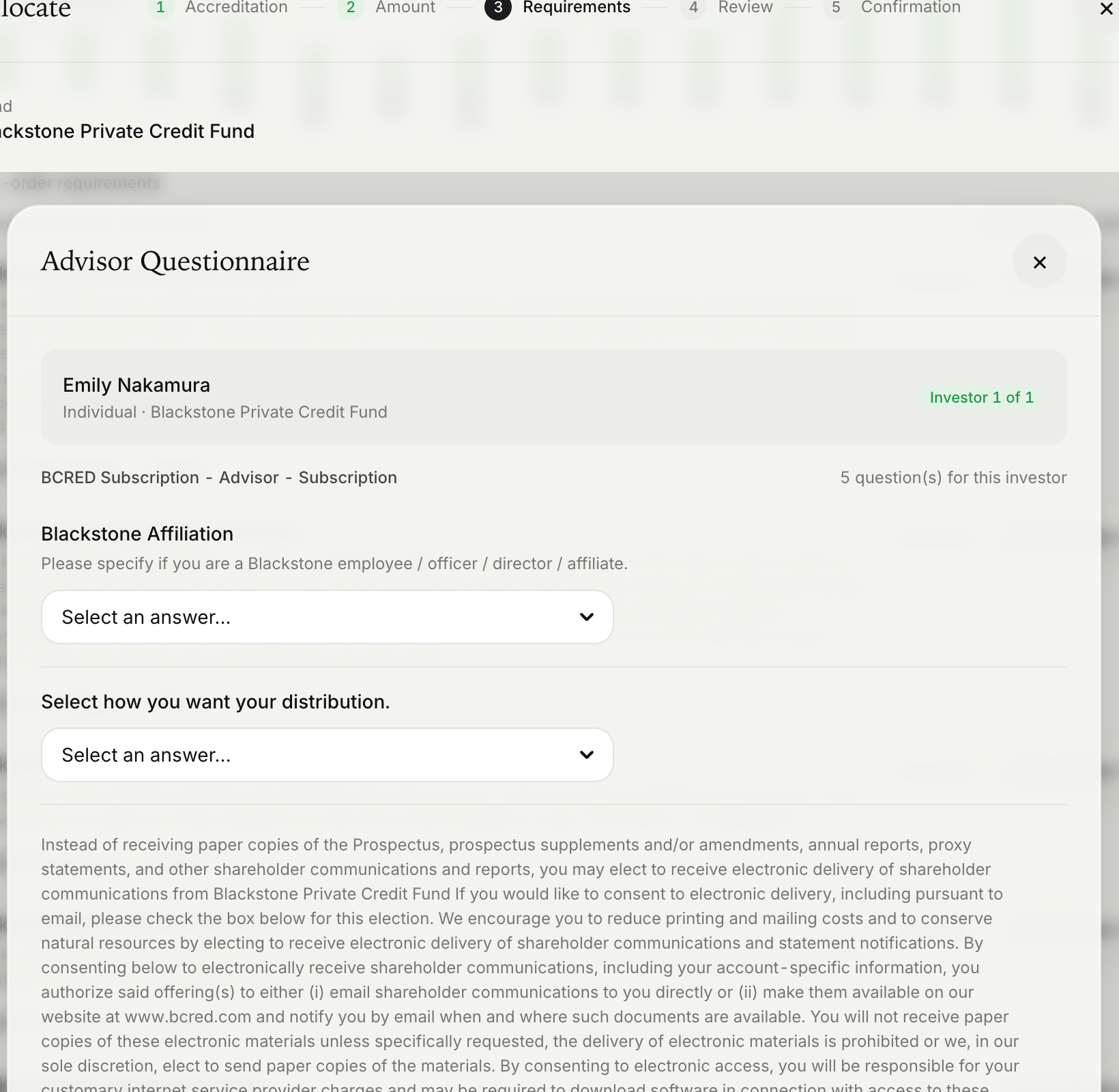
1. Retrieve the questions. The requirement's dataId is the questionnaire ID. The questions returned depend on who is being asked - for example, individuals can receive state-specific suitability questions that entities do not - so always send the order context.
GET /primary/v1/questionnaire/{dataId}?investorId={primaryOwnerPartyId}&accountId={accountId}&financialAdvisorId={financialAdvisorId}| Query parameter | Description |
|---|---|
investorId | The partyId of the account's primary owner. |
accountId | The account the order will be placed for. |
financialAdvisorId | Only when the questionnaire's responsibleParty is Advisor. Leave it out for Investor and CoOwner questionnaires. |
jointAccountOwnerId | Required for a joint account when the answers are not an advisor's. Can't be combined with financialAdvisorId. |
2. Render each question from its format:
format | Suggested control |
|---|---|
Boolean | Yes / No toggle |
MultipleChoiceSingle | Radio group or select, from options |
MultipleChoiceMultiple | Checkbox group, from options |
Integer, Float, Percentage | Numeric input |
Scale | Slider or stepped scale, from scaleMin, scaleMax, and scaleStep |
Date | Date picker |
Text, Email | Text input |
Order questions by sequence, show explanation as help text, enforce required, and use dependentOn to show follow-up questions only when the question they depend on has been answered accordingly.
3. Submit the answers with the same context. Answer only the questions that were returned. Answers count toward the requirement only for the party it names: send financialAdvisorId for an Advisor questionnaire, and leave it out for Investor and CoOwner questionnaires, or the requirement stays Required.
POST /primary/v1/questionnaire-answer{
"questionnaireId": "9e2b7f10-0000-4000-8000-0000000000a7",
"investorId": "0a4f6c1e-0000-4000-8000-000000000011",
"accountId": "06309316-0000-4000-8000-000000000021",
"createQuestionAnswers": [
{ "questionnaireQuestionId": "c41f0b7e-0000-4000-8000-000000000001", "value": "true" },
{ "questionnaireQuestionId": "c41f0b7e-0000-4000-8000-000000000002", "values": ["Growth", "Income"] }
]
}Use value for single answers and values for MultipleChoiceMultiple. Once every required question has been answered by the right party, the requirement is Satisfied. There is no separate complete call.
Confirm before you continue
After the last requirement is completed, evaluate again and check allSatisfied before you enable the submit button. Do not infer it from your own UI state, because a requirement can be satisfied, or become required, outside the current session.
Handling errors
| Response | Cause | What to do |
|---|---|---|
400 on evaluate | The request is invalid - for example, a required query parameter is missing, or the share class doesn't belong to the fund. | Fix the request. This is an integration error, not a user error. |
400 on evaluate | The account's custodian is not enabled for the fund, or the advisor is at a different custodian from the account. detail explains. | Offer the fund only to accounts at an enabled custodian, and check the advisor. |
404 on evaluate | The account, advisor, fund, or share class was not found. | Confirm the IDs exist in this environment and the account belongs to your platform. |
409 on evaluate | The account is closed. | Choose an active account. |
400 on complete | The requirement is a Questionnaire, or the body is invalid. | Submit questionnaire answers instead. |
404 on complete | The definitionId was not found, or doesn't apply to this account and advisor - for example, an Advisor requirement completed without financialAdvisorId. | Evaluate again, use the definitionId values returned, and send the same financialAdvisorId you evaluated with. |
Errors on these endpoints are returned as a problem details object with status and detail. Invalid parameters return a validation problem with an errors map keyed by field.
Next steps
- Submit the order: Subscriptions (Buy Orders)
- Evaluate many accounts in one request: Model Orders
Updated 27 days ago