
Fund Detail
Build the fund page: profile, terms and liquidity, share classes, NAV history, fees, documents, and optional EvergreenLink fund data.
The fund detail page is where a user decides whether to invest. Evergreen funds are offered continuously, so this page is both the diligence view and the starting point for every subscription into the fund. It needs to make three things clear before the user reaches an order ticket: what the fund is, how and when money can move in and out of it, and what it costs.
Endpoints used
| Method | Endpoint | Purpose |
|---|---|---|
GET | /primary/v1/omnibus/fund/{id} | Fund profile, terms, liquidity, and eligibility, with its share classes, fees and, with includeDocuments=true, documents |
GET | /primary/v1/omnibus/nav-report | NAV history of a share class (omnibusShareClassId) |
GET | /primary/v1/omnibus/share-class, /primary/v1/omnibus/fee-structure | Optional. Share classes or fees on their own |
GET | /primary/v2/document | Optional. The fund's documents on their own (omnibusFundId) |
GET | /primary/v1/secondarylink/evergreen-* | Optional EvergreenLink fund data. See EvergreenLink fund data, below. |
Workflow
- Retrieve the fund by
idwithincludeDocuments=true. The response includes its share classes (each with NAV reports and fees), fund-level fees, and documents. - Retrieve NAV history for the selected share class.
- If the fund has a
cikand your platform licenses EvergreenLink, load the EvergreenLink sections. - Show an "Invest" action that carries the fund's
id, and the selected share class, into the order flow.
Fund profile
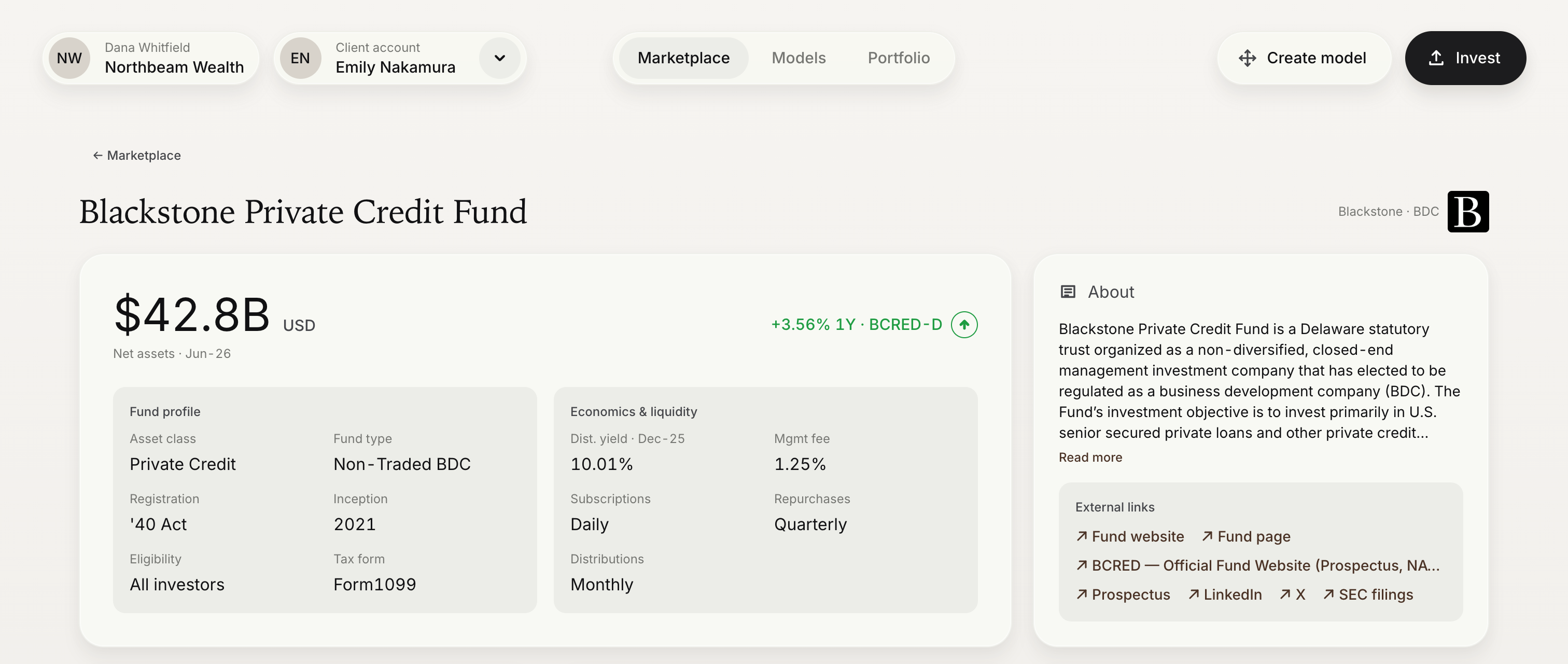
GET /primary/v1/omnibus/fund/{id}?includeDocuments=true| UI element | Source | Notes |
|---|---|---|
| Logo | Fund.logoUrl | |
| Fund name | Fund.name | |
| Manager | Fund.fundManager.name | Fund.fundAdvisorName carries the legal name of the fund's adviser. |
| Symbol | Fund.symbol | |
| Asset class | Fund.assetClass | |
| Structure | Fund.structure | |
| Assets under management | Fund.aum | Denominated in Fund.currency. |
| Vintage | Fund.vintage | A year, such as 2021. |
| Tax form | Fund.taxForm | K1, Form1099, or Other. Fund.taxReporting carries free-text detail. |
| Eligibility | Fund.allInvestors, accreditedInvestor, qualifiedClientInvestor, qualifiedPurchaserInvestor | See Accounts & Eligibility. Non-US investors are not supported, so don't display nonUSInvestor as an eligibility option. |
| Description | Fund.description | Can be long. Truncate it behind a "Read more" control. |
| Website | Fund.website | |
| Education links | Fund.educationLinks[].title, Fund.educationLinks[].url | Open in a new tab. |
The reference implementation's header also shows net assets, a trailing return, and a distribution yield. Those figures come from EvergreenLink, the optional data set described below, and not from the fund endpoint.
Terms and liquidity
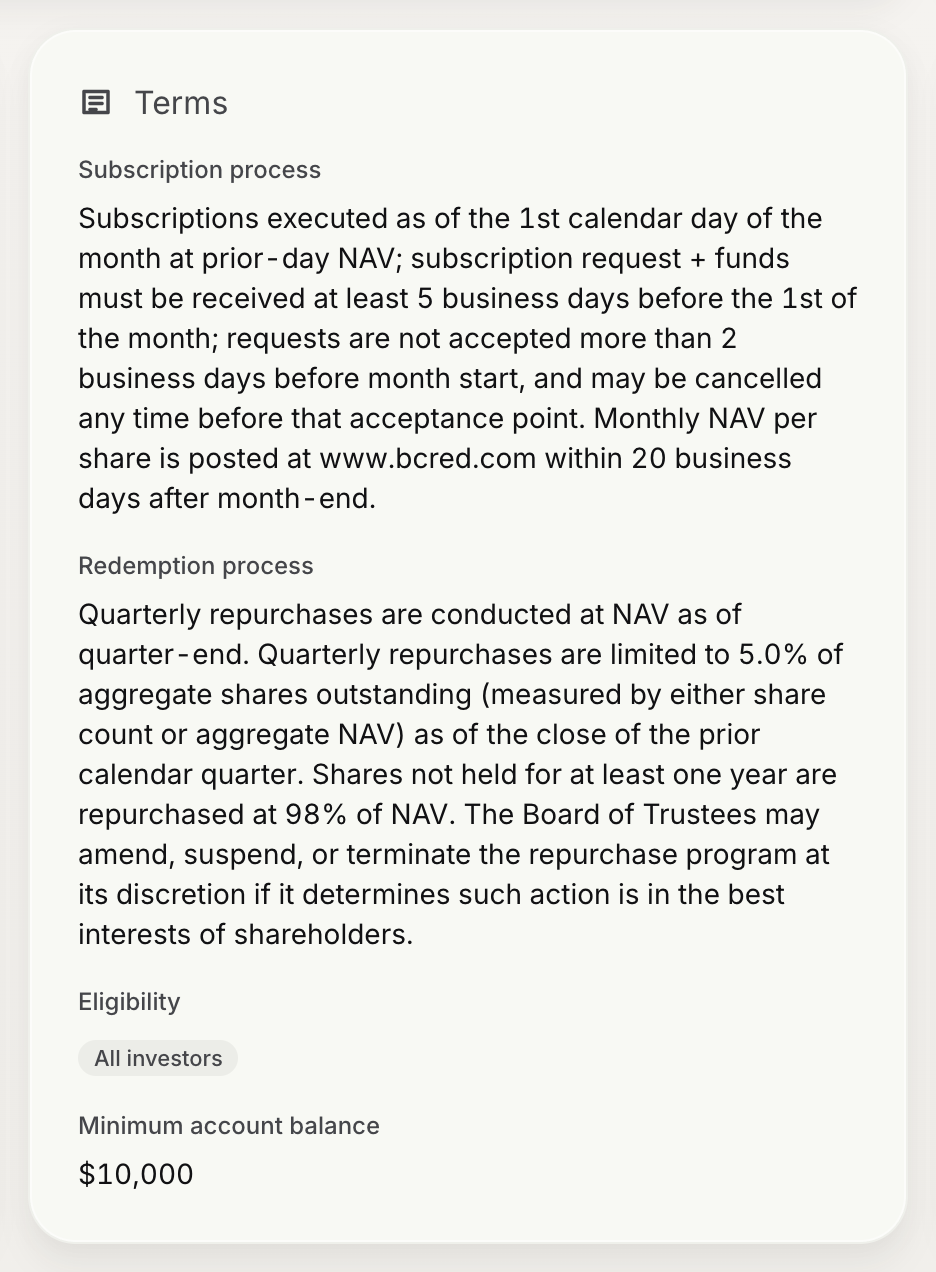
Evergreen funds accept subscriptions and redemptions on a schedule, and most limit how much of the fund can be redeemed in each window. Users need to understand this before they invest, so give the fund's liquidity terms a prominent place on the page rather than leaving them to the prospectus.
| UI element | Source | Notes |
|---|---|---|
| Subscription frequency | Fund.subscriptionCadence | Daily, Weekly, Monthly, Quarterly, or Annual. |
| Subscription process | Fund.subscriptionProcess | Free text describing cut-offs and the pricing date. |
| Redemption frequency | Fund.redemptionCadence | Weekly, Monthly, Quarterly, or Annual. |
| Redemption limit | Fund.redemptionValue | The share of the fund's NAV that is redeemed in each window. Can be null. |
| Redemption process | Fund.redemptionProcess | Free text describing notice periods and proration. |
| Distribution frequency | Fund.distributionCadence | Monthly, Quarterly, or Annual. |
| Distribution process | Fund.distributionProcess | Free text. Can be null. |
| Minimum account balance | Fund.minimumAccountBalance | Free text, such as "$10,000". Can be null. |
Note: The process fields are written by the fund and can run to several sentences. Display them in full. Do not attempt to parse dates or percentages out of them.
Share classes
Orders are placed against a share class, never against the fund. List the fund's share classes from Fund.shareClasses and have the user choose one before they invest. To load them on their own, use:
GET /primary/v1/omnibus/share-class?omnibusFundId={fundId}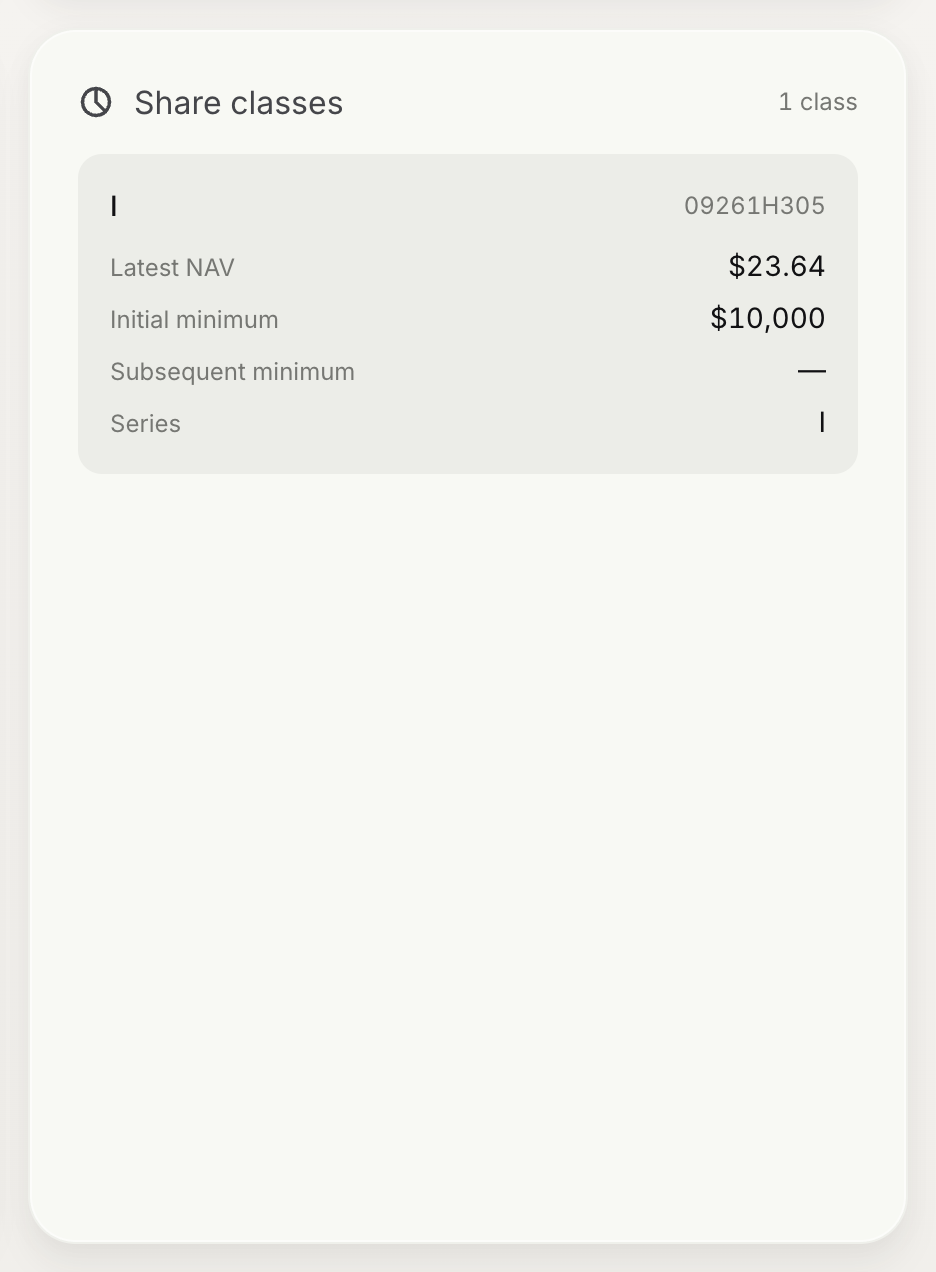
| UI element | Source | Notes |
|---|---|---|
| Label | ShareClass.symbol, falling back to ShareClass.series | Share classes have no display name. |
| CUSIP | ShareClass.cusip | |
| Intended for | ShareClass.description | The account types the class is designed for, such as fee-based advisory or brokerage accounts. |
| Initial minimum | ShareClass.initialMinimumInvestment | Null means no minimum. |
| Subsequent minimum | ShareClass.subsequentMinimumInvestment | Applies when the account already holds the share class. |
| Latest NAV | Most recent NAVReport.nav for the share class | See NAV history, below. |
Offering the right share class for the account type - advisory, brokerage, or retirement - is your platform's responsibility. If your firm distributes only some of a fund's share classes, filter the list before you show it.
NAV history
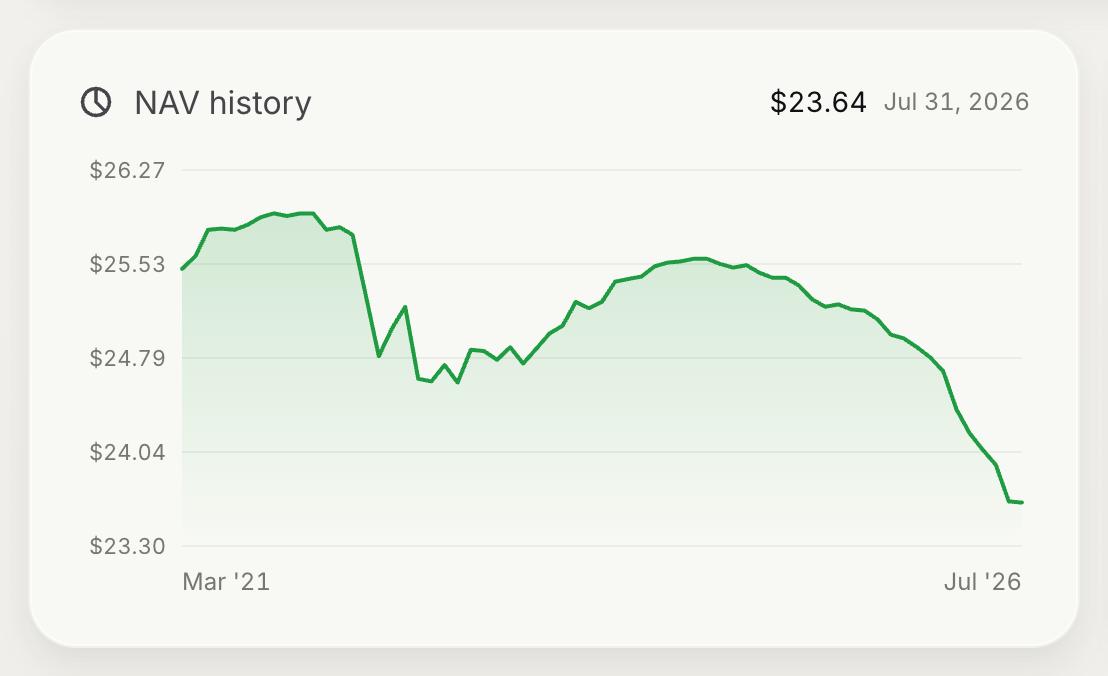
Evergreen funds transact at net asset value, which is reported per share class.
GET /primary/v1/omnibus/nav-report?omnibusShareClassId={shareClassId}&startDate=2025-01-01{
"items": [
{
"id": "01a0617a-0000-7000-8000-0000000000a1",
"omnibusShareClassId": "01a06194-0000-7000-8000-0000000000c1",
"reportDate": "2026-08-31",
"nav": 25.41
}
],
"pagination": { "totalRecords": 20, "totalPages": 1, "currentPage": 1 }
}
| UI element | Source | Notes |
|---|---|---|
| Latest NAV | nav of the report with the most recent reportDate | Show the reportDate beside it, so the user knows how current the price is. |
| Chart series | reportDate, nav | Narrow the range with startDate and endDate. |
| Share class selector | The fund's share classes | Each share class has its own NAV series. |
Important: The latest NAV is the last price the fund reported, not necessarily the price an order will receive. Orders fill at the next NAV the fund strikes, except that a netted fill on a monthly-NAV fund is priced at the last NAV the fund has published when the netting session runs. Label any figure that you derive from the latest NAV as an estimate.
Fees
Each fee belongs either to the whole fund or to a single share class. The fund response carries fund-level fees in Fund.feeStructures and each class's fees in Fund.shareClasses[].feeStructures. To load them on their own, query fund-level fees with omnibusFundId and class fees with omnibusShareClassId:
GET /primary/v1/omnibus/fee-structure?omnibusShareClassId={shareClassId}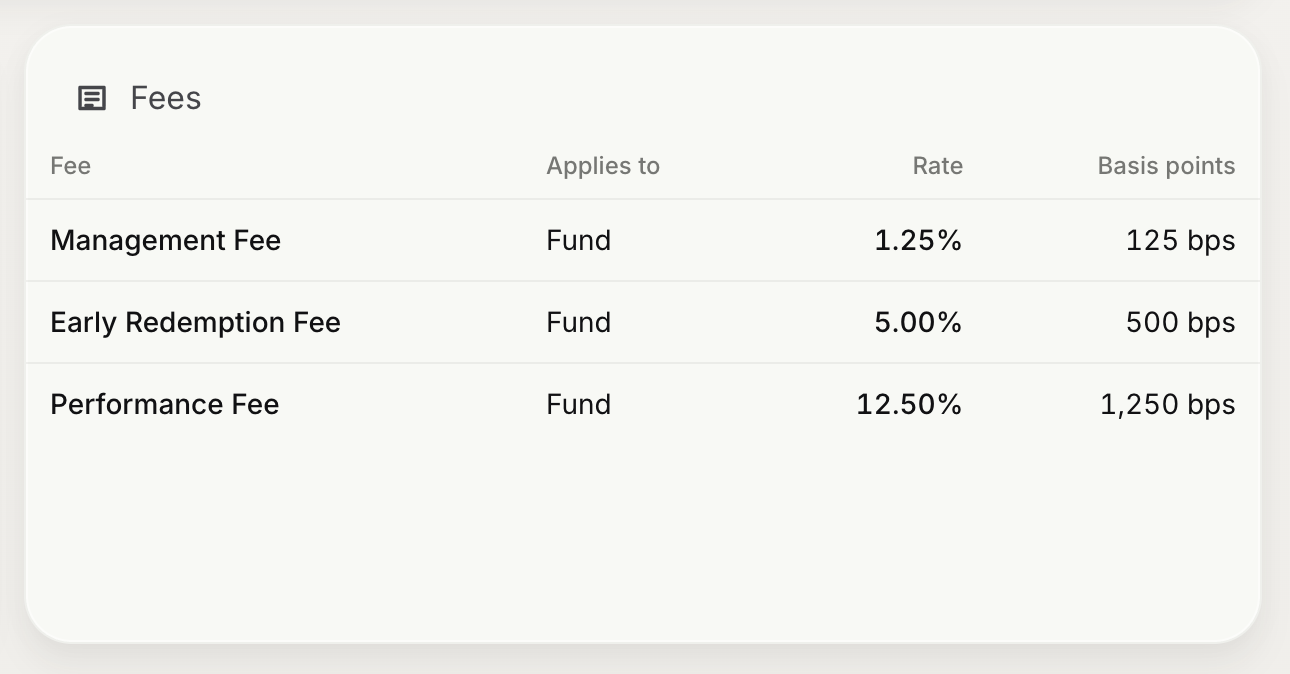
| UI element | Source | Notes |
|---|---|---|
| Fee name | FeeStructure.feeType | See the table below. |
| Rate | FeeStructure.feeValue | Typically a percentage. |
| Detail | FeeStructure.description | Optional free text, such as a hurdle rate or a fee schedule. |
| Applies to | FeeStructure.omnibusShareClassId | When set, the fee applies to that share class only. When null, it applies to the whole fund. |
feeType | Display name |
|---|---|
MANAGEMENT_FEE | Management fee |
PERFORMANCE_FEE | Performance fee |
DISTRIBUTION_FEE | Distribution fee |
SALES_LOAD | Sales load |
When the user changes share class, update the fee table to show fund-level fees together with the fees of the selected class.
Documents
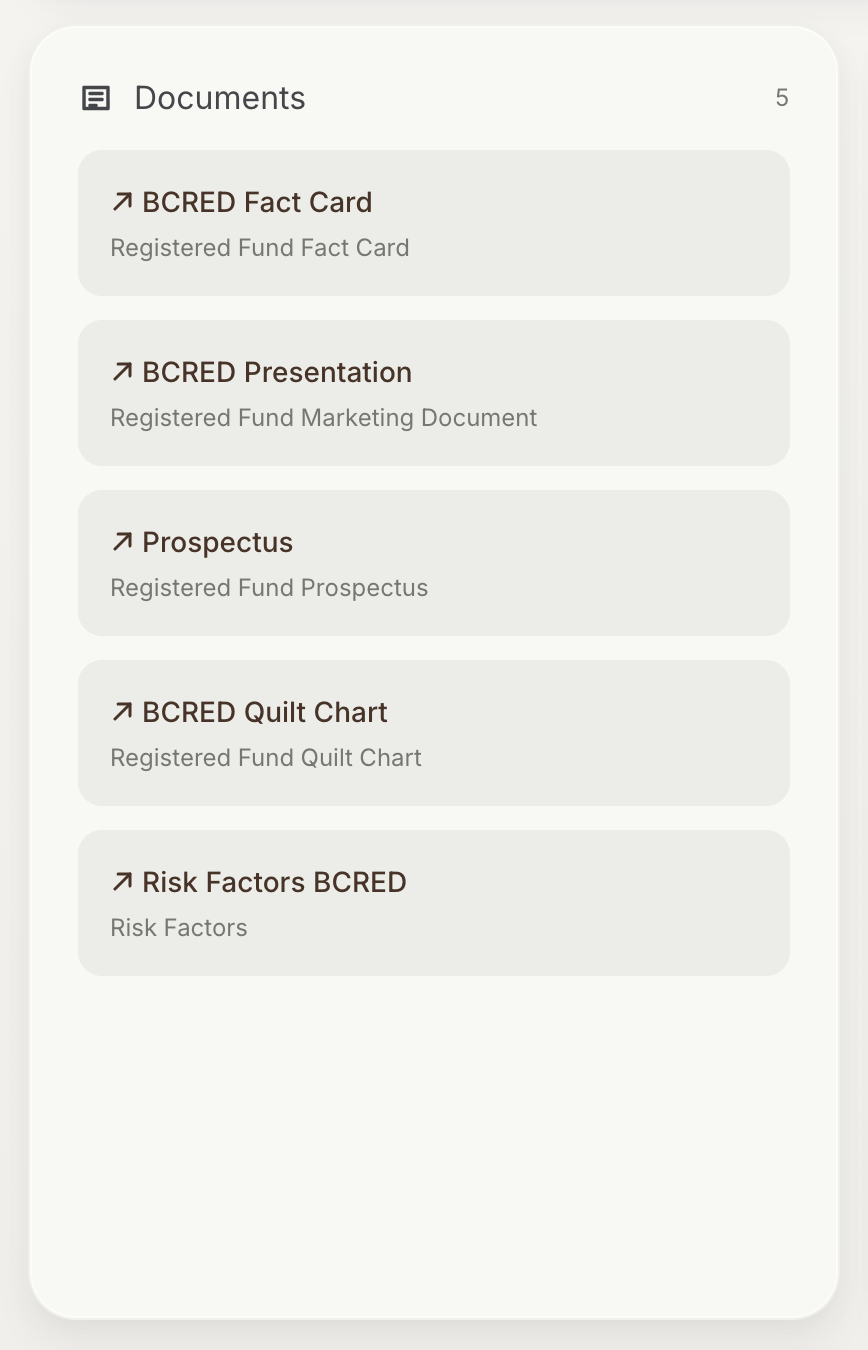
A fund's documents, such as its prospectus and fact card, are returned in Fund.documents when you request the fund with includeDocuments=true. To list them on their own, use:
GET /primary/v2/document?omnibusFundId={fundId}| UI element | Source | Notes |
|---|---|---|
| Document name | Document.name | |
| Document type | Document.type | For example, a prospectus or fact card. |
| Description | Document.description | |
| Open | Document.url | A tokenised link that opens the file. Document.streamUrl supports range requests, for embedded PDF viewers. |
If the fund has no documents, hide the section.
Note: Documents that a user must acknowledge or sign before investing are delivered through Pre-Order Requirements, not through this section. Listing a prospectus here does not record that the user has received it.
EvergreenLink fund data
The Omnibus endpoints describe what a fund is and how to trade it. EvergreenLink is a separate data set that answers a different question: how the fund has performed and what it holds. It is third-party data — drawn from each fund's own filings and reporting rather than from Monark's order book — which Monark ingests, normalises, and serves from the secondarylink/evergreen-* routes of the same API. If your platform licenses it, it is what turns a fund page into a research page.
The two data sets are joined on the fund's SEC Central Index Key, Fund.cik.
| Section | Endpoint | Filter |
|---|---|---|
| Growth of $100, net assets | /primary/v1/secondarylink/evergreen-growth/financial-institution/{financialInstitutionId} | cik |
| Capital flows | /primary/v1/secondarylink/evergreen-capital-flows/financial-institution/{financialInstitutionId} | cik |
| Portfolio composition | /primary/v1/secondarylink/evergreen-portfolio-composition/financial-institution/{financialInstitutionId} | cik |
| Trailing returns | /primary/v1/secondarylink/evergreen-returns/financial-institution/{financialInstitutionId} | evergreenFundId |
| Share class detail | /primary/v1/secondarylink/evergreen-share-classes/financial-institution/{financialInstitutionId} | evergreenFundId |
EvergreenLink access is granted per financial institution. Pass the financialInstitutionId of a custodian that Monark has enabled for it; other IDs return 403.
Call the growth endpoint first, filtered by cik. Every row it returns carries the evergreenFundId that the returns and share classes endpoints filter on — those two ignore cik.
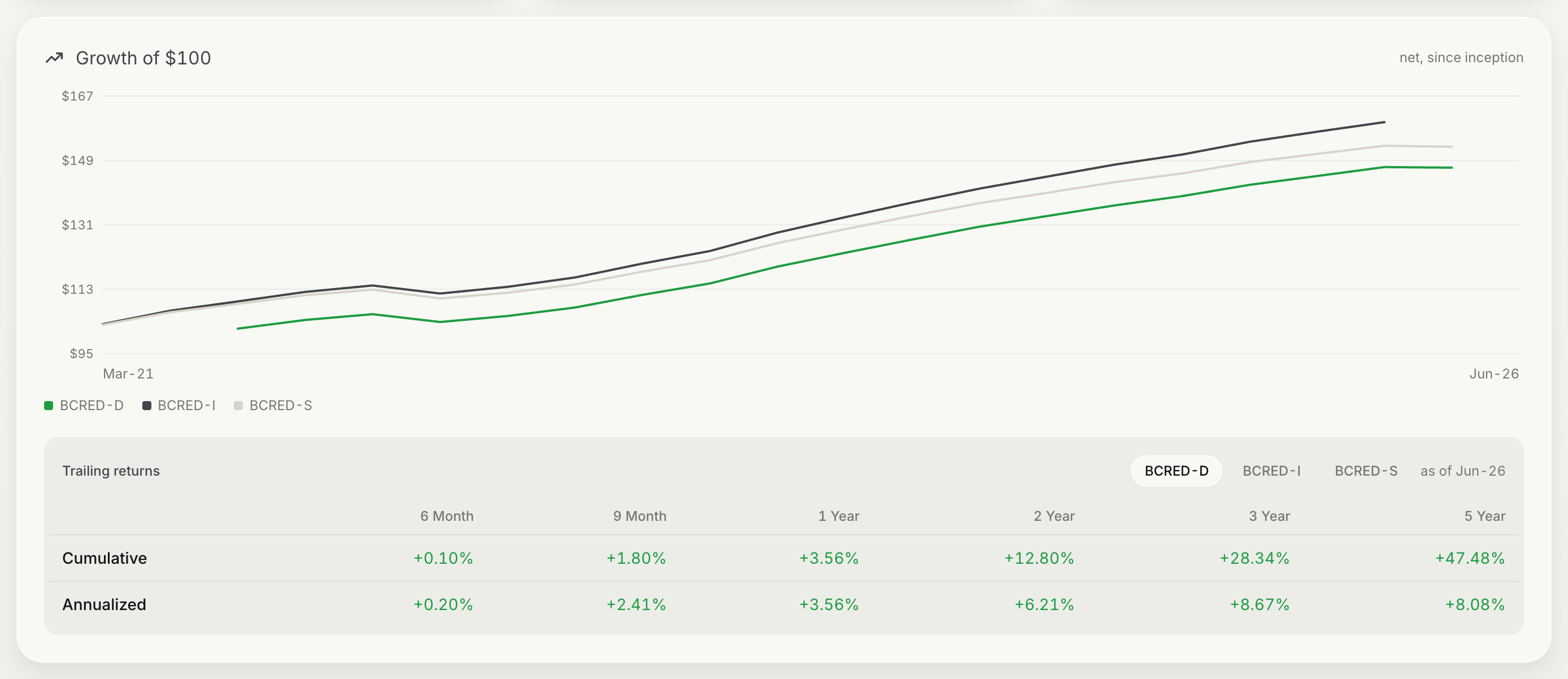
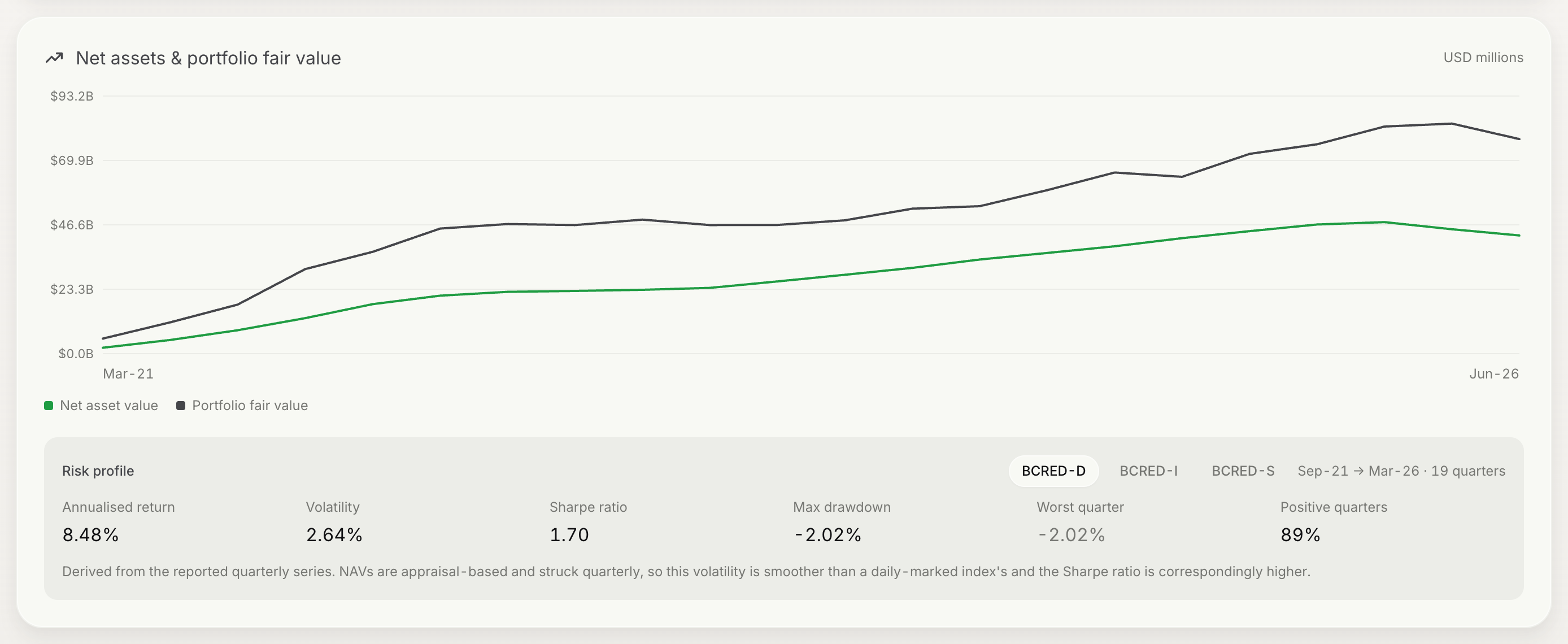
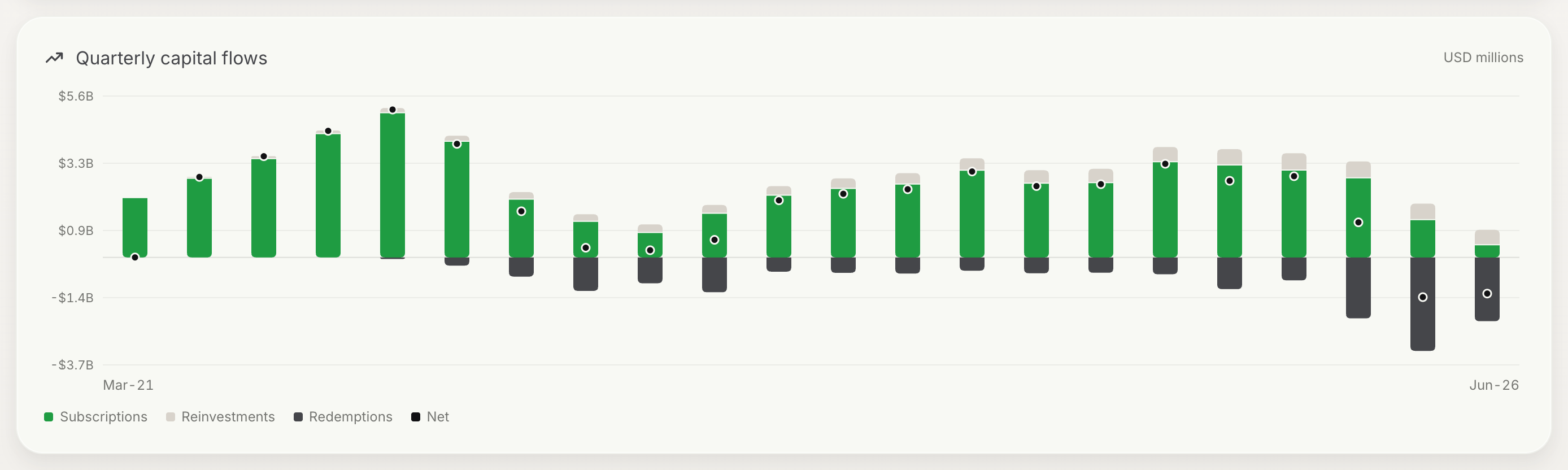
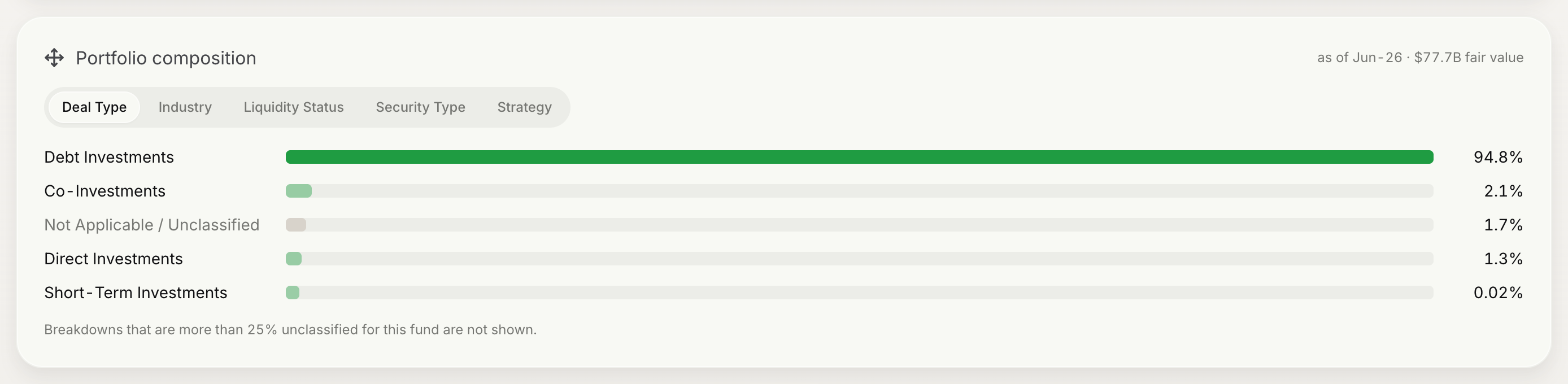
If a fund has no cik, or its cik matches no EvergreenLink fund, hide these sections. An empty chart reads as missing data.
Invest action
Give the page a persistent primary action that starts the order flow for the active account. Platforms that support model portfolios can offer a second action that starts a Model Order for the same fund.
| Action | Carries | Leads to |
|---|---|---|
| Invest | Fund.id, selected ShareClass.id, active accountId | Pre-Order Requirements, then Subscriptions (Buy Orders) |
| Create model | Fund.id | Model Orders |
Disable the action, with an explanation, when no account is selected or when the account does not meet the fund's eligibility requirements.
Next steps
- Find out what the account must complete before it can invest: Pre-Order Requirements
Updated 27 days ago