
Integration Overview
What a brokerage builds on Monark's private markets APIs, the order to build it in, and the conventions that apply to every call.
Integrating through Apex AscendOS?The product guidance on this page applies to you. The endpoints, fields and statuses are Monark's; use the AscendOS equivalents listed in Building on Apex AscendOS.
Monark's private markets APIs give brokerage and wealth platforms programmatic access to late-stage private companies. Your platform owns the investor experience end to end. Monark sources the shares, forms and administers the SPV that holds them, produces the offering and subscription documents, accepts subscriptions, and maintains positions, statements and tax documents for every investor.
These guides walk through each surface of a typical integration in the order you would build it. Every guide lists the endpoints it uses, maps API fields to UI elements, and shows a reference implementation.
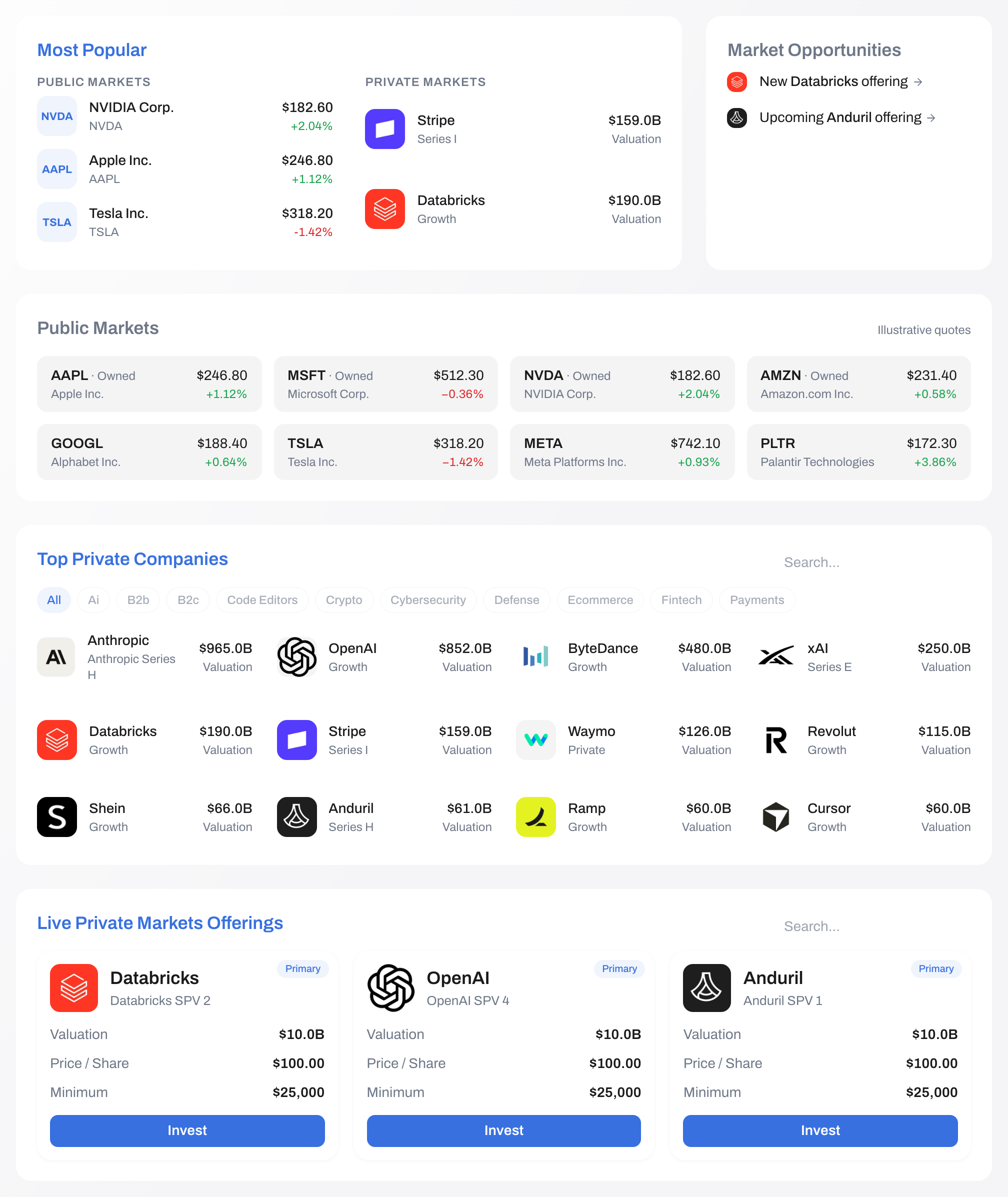
What You Will Build
| Surface | What the user does | Guide |
|---|---|---|
| Accounts | Opens the account that will hold the investment | Investor Accounts |
| Accreditation | Self-certifies how they qualify as an accredited investor | Accreditation |
| Marketplace | Browses live offerings, upcoming offerings and the company catalogue | Marketplace |
| Company view | Researches a company before committing | Company View |
| Indications of interest | Registers non-binding interest in an upcoming offering | Indications of Interest |
| Offering view | Reviews deal terms, fees, allocation and documents | SPV View |
| Order | Commits a dollar amount to an SPV | Submit an Order |
| Required actions | Reads disclosures, acknowledges, and signs the subscription agreement | Transaction Actions |
| Portfolio | Tracks positions, valuations, statements and tax documents | Portfolio View |
Registered funds build on the same foundations. See Registered Funds.
How an Investment Flows
- Open the account. Every transaction is placed for an investor or an account. Create the parties once, then reuse them.
- Record accreditation. Private offerings under Regulation D are for accredited investors. Monark refuses a transaction whose accreditation is missing, expired or
NOT_APPLICABLE. - Present the catalogue. Show live SPV offerings, upcoming prospective offerings, and the companies behind them.
- Present the offering. Show pricing, fees, allocation, the funding deadline and the deal documents, so the investor can make an informed decision.
- Check the cash. Before you submit, confirm the investor's cash balance and lock or debit the amount. Monark does not hold investor cash and cannot see it.
- Create the transaction.
POST /primary/v2/transactionwith a dollar amount. Branch on the response. - Complete the required actions. Read each action Monark returns, present it, and report it complete. When the last one for a responsible party is done, the transaction moves to
Processingand the subscription agreement is countersigned. - Track to close. Follow the transaction by webhook until it reaches
Complete, at which point the investor holds a position in the SPV.
Before You Begin
| Requirement | Detail |
|---|---|
| API key | Keys are issued per environment and carry an expiry. Request a sandbox key at [email protected]. |
| Financial institution | Your financialInstitutionId scopes investors, offerings and market data. Retrieve it from GET /primary/v1/financial-institution. |
| SPV approval | An SPV is only distributable to your investors once your deal or operations team has approved it, in the Alts Desk or through PUT /primary/v2/partner-approval/target/{id}/approve. See Product Flow Overview. |
| Cash controls | Your platform is responsible for confirming and reserving investor cash before a subscription, and for wiring the aggregate at close. |
| Webhooks | Register an endpoint so you are not polling for status changes. See Webhooks. |
Core Concepts
| Concept | Description |
|---|---|
| Partner | Your platform. A partner key can only ever read and write its own investors' data. |
| Financial institution | The broker-dealer, RIA or FFI that holds the relationship with the investor. Every investor belongs to one. A partner with a direct investor relationship uses its default financial institution. |
| Pre-IPO company | The private company the investor is getting exposure to. Carries descriptions, leadership, funding history, news, research and pricing. |
| Pre-IPO company investment | The shares an SPV holds in a company, and the terms on which they were acquired. Not an investor's holding. |
| Pre-IPO company SPV | The vehicle the investor actually subscribes to. Currently one SPV per investment. |
| Prospective offering | A potential SPV that does not exist yet. Terms are given as ranges and investors may only submit non-binding indications of interest. |
| Indication of interest | A non-binding expression of demand against a prospective offering. No signature, no cash check. |
| Transaction | An investor's subscription to an SPV, and the record that carries it to close. |
| Transaction action | A disclosure, acknowledgement, signature or questionnaire that must be completed before a transaction can proceed. |
| Position | The investor's settled holding in an SPV, with its cost basis and current value. |
Conventions
Authentication. Send your API key in the Authorization header on every request. Both Authorization: <key> and Authorization: Bearer <key> are accepted. Keys expire, and an expired key fails authentication rather than degrading.
Environments. Sandbox and production are separate deployments with separate keys and separate data. An investor created in sandbox does not exist in production.
| Environment | Base URL |
|---|---|
| Sandbox | https://sandbox-api.monark-markets.com |
| Production | Issued by Monark at go-live |
Pagination. List endpoints accept page (default 1) and pageSize (default 25), and return an items array alongside a pagination object:
{
  "items": [],
  "pagination": { "totalRecords": 65, "totalPages": 3, "currentPage": 1 }
}
Webhooks. Status changes are delivered by webhook, so your platform does not need to poll. Events can arrive out of order, so treat each one as a signal and re-read the record with a GET before acting on it. See Webhooks.
Units. Subscriptions are denominated in dollars (amountReservedDollars, up to 2 decimal places). Share quantities, where they appear, carry up to 6 decimal places — SPV interests are fractional.
Idempotency. POST requests accept an optional IdempotencyKey header. Send one on every transaction submission so that a retry after a timeout cannot create a duplicate. Keys are cached for 24 hours.
Identifiers you supply. These are echoed back on every read and are the simplest way to reconcile Monark's records with your own:
| Field | Set on | Purpose |
|---|---|---|
referenceId | Transactions | Your own order identifier. Maximum 100 characters, and filterable on GET /primary/v2/transaction. |
externalAccountNumber | Transactions created with an investorId | Your platform or custodian account number. Cannot be combined with accountId. |
Enumerations are case-sensitive. Send Subscription, not SUBSCRIPTION. Accreditation statuses are sent as strings exactly as written, for example NET_WORTH_GT_1M.
Only subscriptions. A Pre-IPO SPV transaction can only be a Subscription. Redemption and Transfer are supported for registered funds, not for SPVs.
Transaction Lifecycle
A subscription to an SPV reaches exactly six of the eight TransactionStatus values. Initiated and PendingCancellation are produced only for registered-fund and drawdown transactions, never for an SPV.
| Status | Meaning | Terminal |
|---|---|---|
Pending | Created, with actions outstanding. The investor can still edit or withdraw, and editing does not reset completed actions. Consumes no allocation. | No |
Processing | Every action is complete and the subscription agreement is signed. The commitment is binding, capacity is now consumed, and the money is expected. | No |
Settled | Monark has confirmed cash settled with an external account. Set by Monark, not reachable by a partner call. | No |
Complete | The SPV closed, the issuer received cash and countersigned. The investor holds a position. | Yes |
Canceled | Cancelled, by investor action, insufficient funds, incomplete documentation or issuer rejection. | Yes |
Failed | Signing or fund administration failed. The investor receives neither shares nor cash; release any funds you reserved. | Yes |
Note the spelling: Canceled, with one l.
Important: A
Pendingorder reserves nothing. Allocation and seats are consumed atProcessing, not at creation, so two investors can both hold pending orders that together exceed what is left. Monark re-validates the stage, the investor, the remaining allocation and the seat count at the moment the last action completes — which means a subscription that was accepted can still be refused on the way toProcessing. Your UI has to handle that late failure, not just the one at create time.
Important: Branch on
status, not only on the HTTP status code, and show the returned message to the user. A refused subscription returns a message naming the reason — the minimum commitment, the remaining allocation, or the seats left in the SPV — and those are all correctable by the investor.
There is no partner-callable way to settle or complete a transaction. Both are driven by Monark as the SPV closes.
Constraints Worth Knowing Before You Design
These catch integrations out late, when they are expensive to accommodate.
| Constraint | Consequence |
|---|---|
| One live order per investor per SPV | A second subscription while one is open is refused with 409 "Active subscription already exists for this SPV and Investor". To change an amount, update or cancel the existing transaction rather than creating another. |
| Joint and retirement accounts are not supported for SPVs | A JointAccount or RetirementAccount investor is refused with "{type} investors are not supported for PreIPO SPV subscriptions." Filter these accounts out of the private markets experience rather than letting them reach an order form. |
| An investor with several accounts must name one | Otherwise the request is refused with "The investor has multiple accounts. Supply AccountId through the v2 endpoint." Send accountId instead of investorId where an investor holds more than one account. |
| Regulation S offerings exclude US investors | Refused with "Cannot create subscription as the SPV is exempt from accredited investor requirements and the investor is US based". |
Cancellation is only possible while Pending | POST /primary/v2/transaction/{id}/reject?targetAssetType=PreIPOCompanySPV. Once the order reaches Processing a partner cannot reverse it — "Cannot reject subscription in Processing state". Tell the investor this before they complete their last action. |
| Per-order fees are not visible to partners | managementFee, feePerShare and carry on the transaction are admin-only and stripped from partner responses. Read fee economics from the SPV (managementFee, investorFeePerShare, allInPricePerShare) instead. |
Data Access
A partner key sees only its own investors. Companies, investments and SPVs are visible to every partner; investors, transactions, indications of interest and questionnaire responses are scoped to the partner that created them. See Data Access Patterns.
Next Steps
- Understand the operational lifecycle and who does what: Product Flow Overview
- Handle status changes without polling: Webhooks
- Take a subscription end to end in the sandbox: Sandbox Walkthrough
- Confirm you are ready for production: Go-Live Checklist
Updated about 16 hours ago